Let’s talk about VCF Management Services
VMware Cloud Foundation 9.1 (and VMware vSphere Foundation for that matter) introduced the VCF Management Services which are sometimes called VMSP or VSP in the product.
In my experience, customers stumble over this new platform in the VCF installer when configuring the update or installation and being faced with questions about CIDR blocks and a chunk of system resources (CPU, memory).
What are the VCF Management Services?
We all know about the well known services like vCenter and Operations but to run a private cloud stack like VCF, a number of auxiliary services are required.
Essentially, the VCF Management Services are a VCF-managed set of virtual machines that form a Kubernetes cluster which hosts and exposes these services for consumption.
To put it simpler, instead of deploying a dozen individual virtual machines with independent lifecycle and availability requirements, we provide a centralized platform that cares for the basics and just runs containers on top of it.
Let’s look at the bare minimum set of services that is deployed in the first VCF Management Services instance (typical in your management domain):
- Fleet lifecycle
- Salt RaaS
- SDDC lifecycle
- Telemetry
- Salt master
- Identity broker
- Software depot
Optionally you can add (after deployment):
- Log management (better known as LogInsight)
- Real-time metrics
As you can see, the first deployment runs a mix of fleet and instance services.
The documentation provinces more details on the distribution of first and other instances.
You might have noticed that some of our existing appliances have been migrated into this platform starting in version 9.1: The fleet management VM is now integrated as a services and so is the new log management. Native services for these platform include the real-time metrics as well as things like the software depot service.
What are the requirements for the VCF Management Services?
Essentially you need a bunch of compute resources as well as a large number of IP addresses that are needed for scale and lifecycle management.
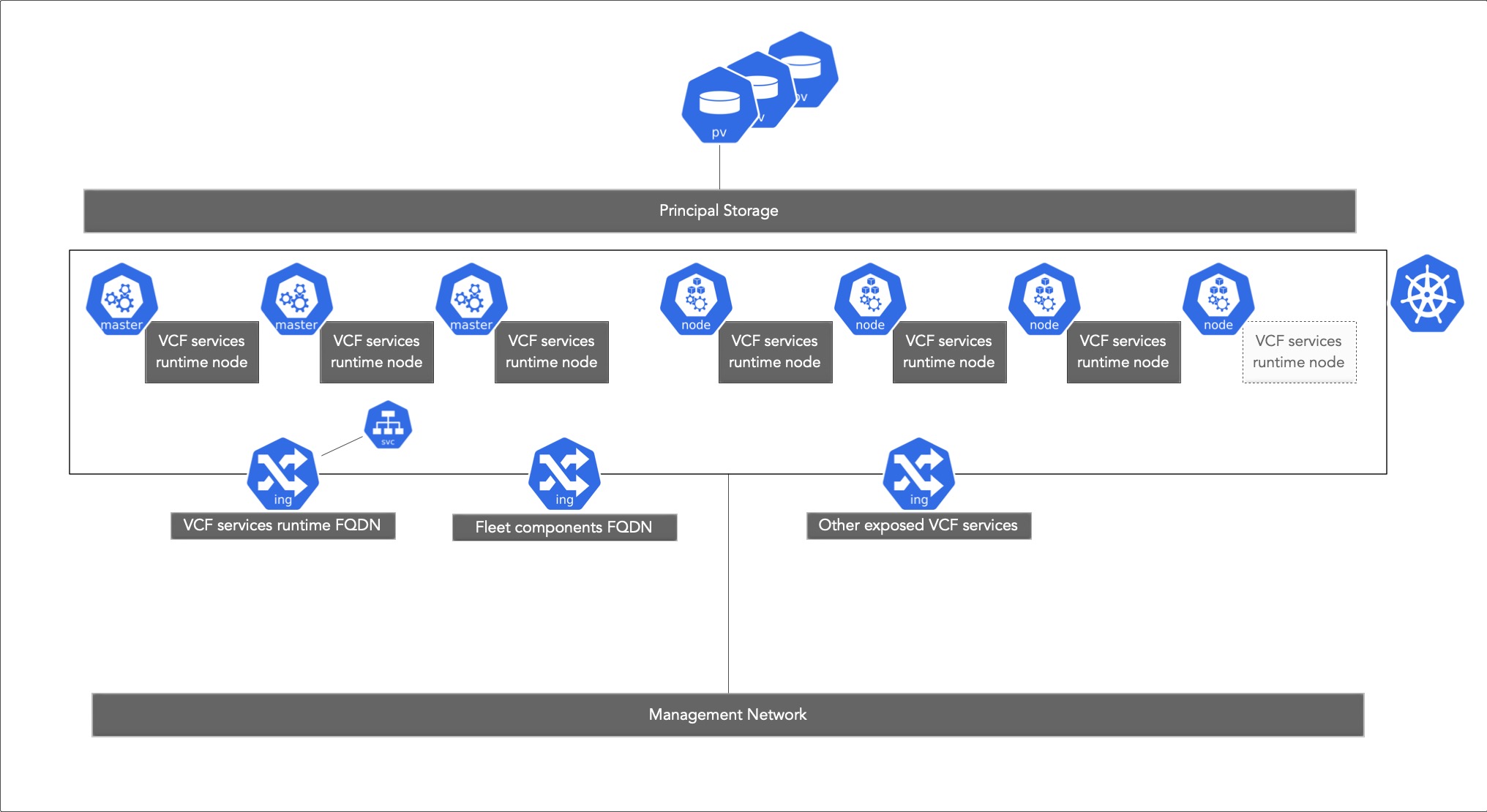
VCF services runtime node IP addresses
The documentation talks about a minimum of 12 IP addresses and a maximum of 30 IP addresses and references a /28 and respective a /27 CIDR blocks.
Now, this throws a lot of people off as CIDR blocks are most commonly used in terms of defining a network.
What you are providing here, is a pool of usable IP addresses in your management network that can be used for the virtual machines (VCF services runtime nodes).
The range between 12 and 30 addresses is pretty big, so what is the correct choice here?
It depends … mainly on the size of your environment and the number of services (but, you can add an additional IP range/block after deployment).
At the beginning of the deployment process, in HA mode, at least three control plane nodes are created and n worker nodes.
As you add services and your compute requirements for these services increase, more worker nodes may be created, taking more IP addresses from the provided IP range.
Also, during lifecycle operations, new virtual machines will be created, the containers respawned on the new nodes and the old nodes will be decommissioned.
Since a pool of addresses has been provided, no user interaction is required for these tasks.
In version 9.1, the installer asks in a greenfield installation (that means you have nothing and start VCF from scratch) for an IP range.
In my example below, this would be 192.168.1.160-192.168.1.192 - exceeding the 30 IP addresses.
Unfortunately, the UI driven brownfield process in 9.1 asks for a CIDR block, making the experience not consistent with the greenfield installation. In my example, this would be 192.168.1.160./27.
In both cases, the same set of IP addresses are used.
For full freedom of choice, you can use the API to specify IP ranges, IP blocks (CIDR) or individual IP addresses.
By default, the IPs are assigned from your existing VM management network but you have the option to specify another network for the deployment of the VCF Management Services.
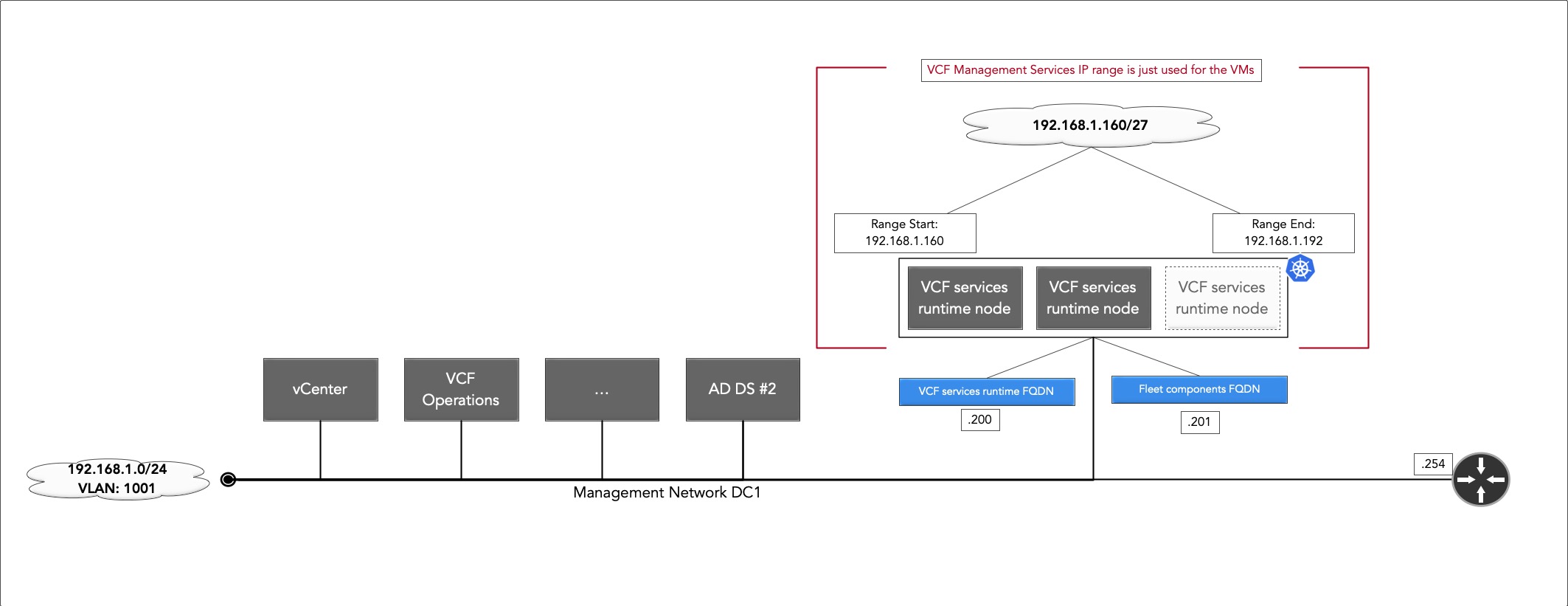
FQDN for components
Some services of the VCF Management Services are exposed to the management network. The documentation calls for a number of FQDNs that need to be assigned, including:
- Fleet components
- Instance components
- VCF services runtime
- …
These FQDN need to be mapped to IP addresses in the same network the VCF services runtime nodes are deployed, meaning that this is part of the network you took the IP range from.
But, these must be outside of the IP range specified for the VCF services runtime nodes
Confusing?
Let’s get back to the picture above:
I specified the range of 192.168.1.160-192.168.1.192 for the VCF services runtime nodes, so these are reserved.
Therefore I will map the FQDNs required to IPs outside that range, e.g.
- VCF services runtime FQDN maps to 192.168.1.200
- Fleet components FQDN maps to 192.168.1.201
Internal Kubernetes networks
As the VCF services runtime forms a Kubernetes cluster, an internal CIDR block is assigned for pods and services.
For those who are not familiar with Kubernetes, these IPs are just used inside the cluster but they may not overlap with networks in your enterprise or you’ll be troubleshooting forever…
By default the IP block 198.18.0.0/15 is used.
If that creates a conflict, you can use the API to adjust the internal CIDR block for VCF management services to 240.0.0.0/15 or 250.0.0.0/15
VCF services runtime node compute resource requirements
Since we are running quite a few services and we form a complete Kubernetes cluster, a couple of resources need to be assigned.
Use the VCF Deployment workbook to determine your exact requirements and don’t rely on reddit.
We differentiate in sizes between small without HA and medium/large deployments with high availability.
To provide a few examples of requirements:
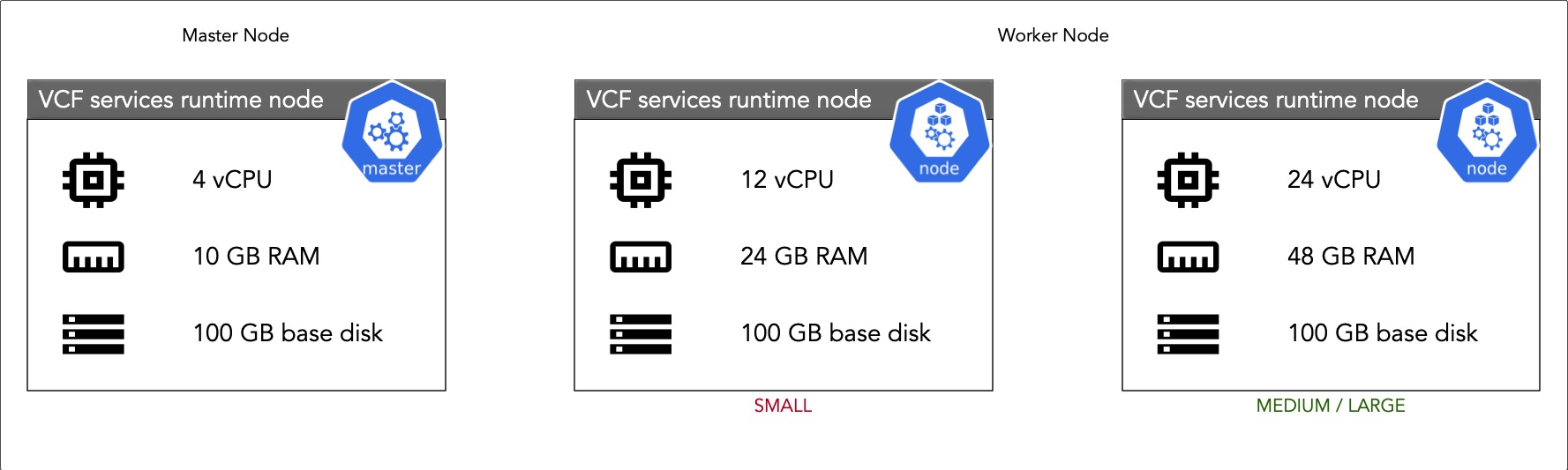
For a small deployment without HA, you will need to calculate with the sum 40 vCPU and 82 GB RAM for all nodes in the initial deployment.
- One Control plane node, each with 4 vCPU and 10 GB RAM.
- The Worker nodes run each with 12 vCPU and 24 GB RAM.
- Each VM has a base disk of 100 GB, worker nodes have additional storage assigned.
In a medium deployment, you will have:
- Three Control plane nodes, each with 4 vCPU and 10 GB RAM.
- The Worker nodes run each with 24 vCPU and 48 GB RAM.
- Each VM has a base disk of 100 GB, worker nodes have additional storage assigned.
VCF services runtime storage requirements
VCF will use your primary datastore to deploy the VCF services runtime nodes.
In addition to that, a set of first class disks (to quote the docs: “First Class Disk (FCD), also known as Improved Virtual Disk, provides storage lifecycle management on virtual disks, independent of virtual machines”) are created on the same datastore.
These FCD host the persistent data of the VCF Management Services and will be attached to the Kubernetes nodes as needed.
For a small deployment the storage requirements for VCF services runtime nodes and FCD is specified with three TB.
This and that about VCF Management Services
Logging into the VCF Management Services
Ideally, this should not happen as this is a managed service from VCF - but then again, most people in IT know that problems are just part of the process. In my earlier blog I already touched on the topic of logging into the shell of the Kubernetes control plane nodes using the vmware-system-user and the password specified during the installation process You can also identify the control plane nodes in operations: Build -> Lifecycle -> VCF Management -> VCF service runtime (scroll down)
Shutting Down VCF Management Services
In case you need a complete shutdown of the system, there is KB 440874 - How to safely shutdown all nodes within a VCF Services Runtime Cluster which includes the required steps and a shutdown script.
Getting debug info
On regular appliances, the default way of obtaining debug or log information would be the parsing of log files in /var/log/vmware/*.
With a container platform like VCF Management Services you have two options
- If you are using VCF Log Management, you can look into the Logstream from the UI
- You can also get the logs directly from the pod using the command line
Getting logs from the command line
In this example, I am running an update from VCF Logs 9.1 to 9.1 EP1 using the fleet management. My lifecycle task has started and the precheck subtask has created another unique ID.
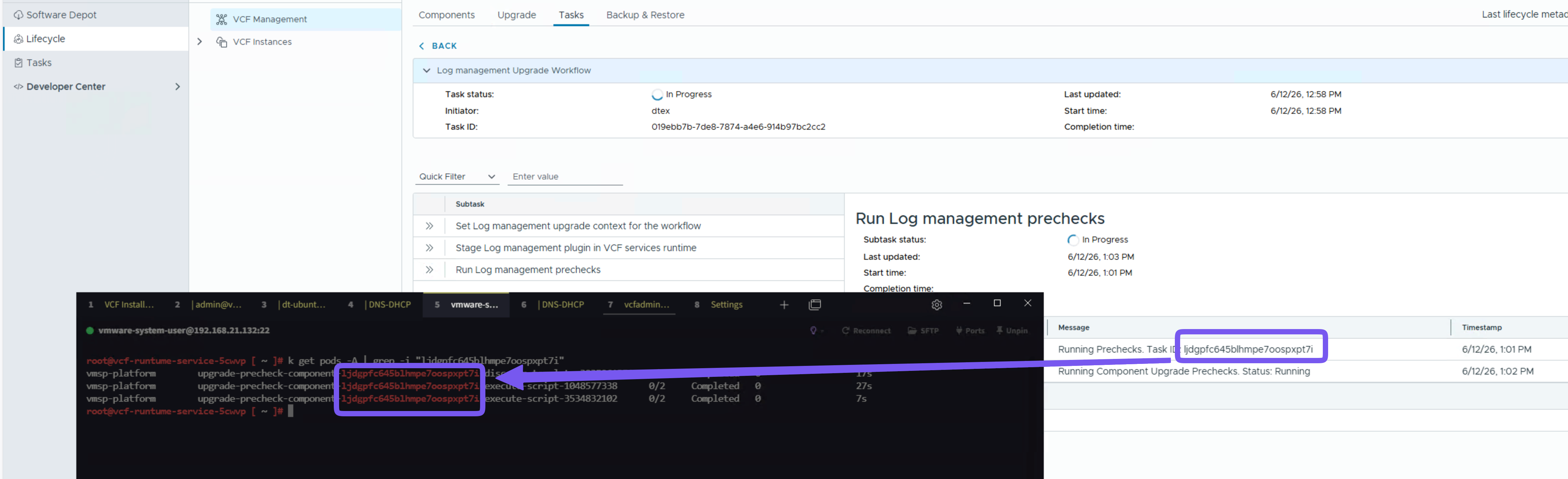
You take take this ID and identify the pod running the precheck ID on the command line using a simple “grep” command.
With the pod identified, a kubectl logs -n <namespace> <podname> will give you the output of the logs.
Managing service resource requirements
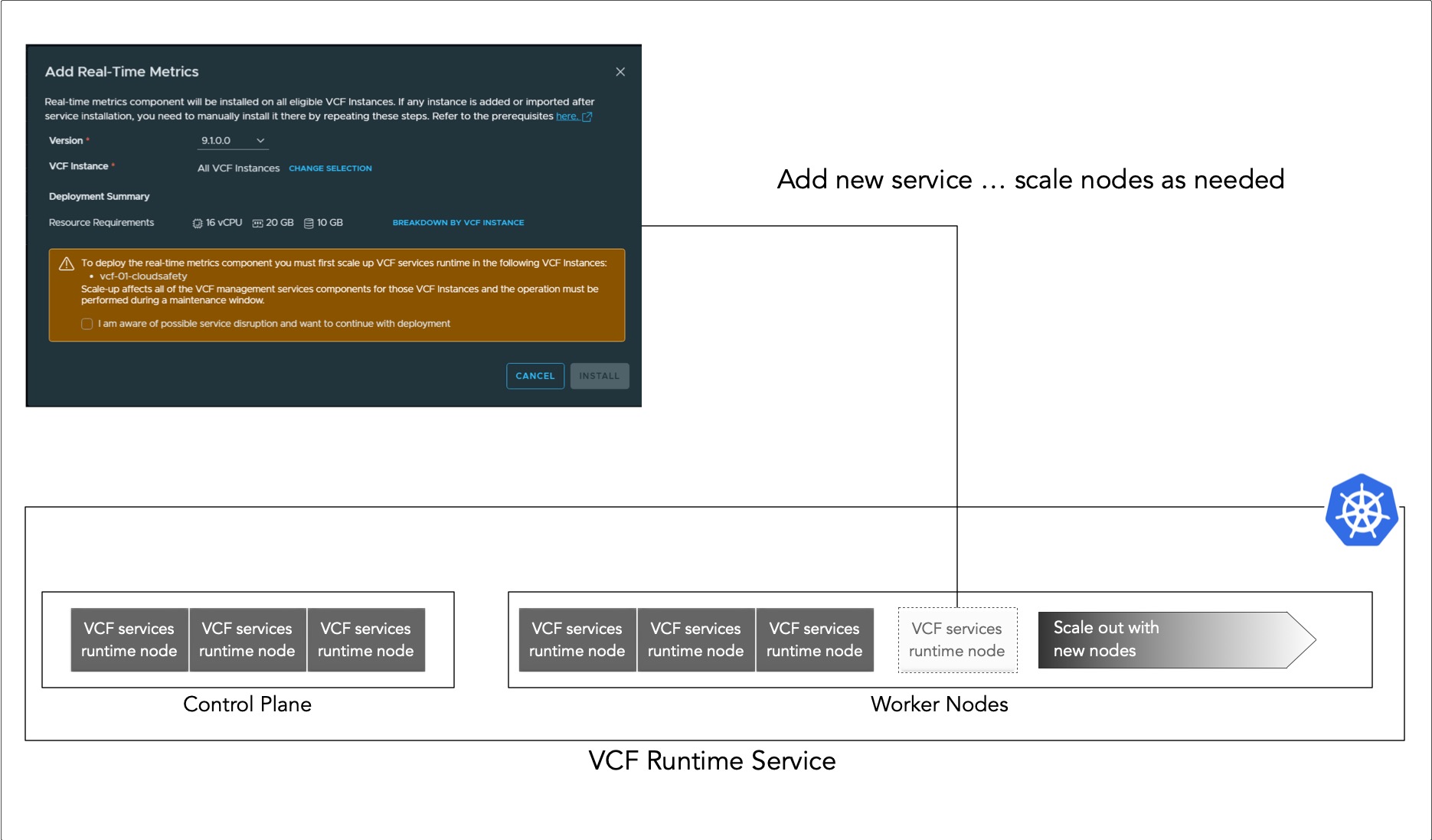
One question that arises quite frequently revolves around how the platform manages the compute requirements for any newly introduced services.
In the example below, which I captured from a VCF 9.1 deployment, I am preparing to enable “Real-time Metrics” as an additional component within the VCF instances.
You will notice that the specified requirements—16 vCPU and 20 GB of RAM—actually exceed the capacity of a single runtime node (in my case I am running the “small” deployment). To handle this, the VCF Management Service simply provisions the necessary number of additional worker nodes to the cluster to meet the demand; it really is that straightforward.
Soure IPs for firewall rules (added 2026-06-26, updated 2026-06-30)
Sometimes you need to create firewall rules and use the ports and protocols overview as a source of truth. With the use of containers, the question comes up how to pinpoint the source of the request if a service is running in a container. The short answer is “you cannot”. Meaning, once a service is running inside the management services, my understand is that the pod (container) can be spawned on any node. Hence, you need to include the complete IP range of the VCF management services as a potential source for your firewall rules.
Since this topic is coming up more and more:
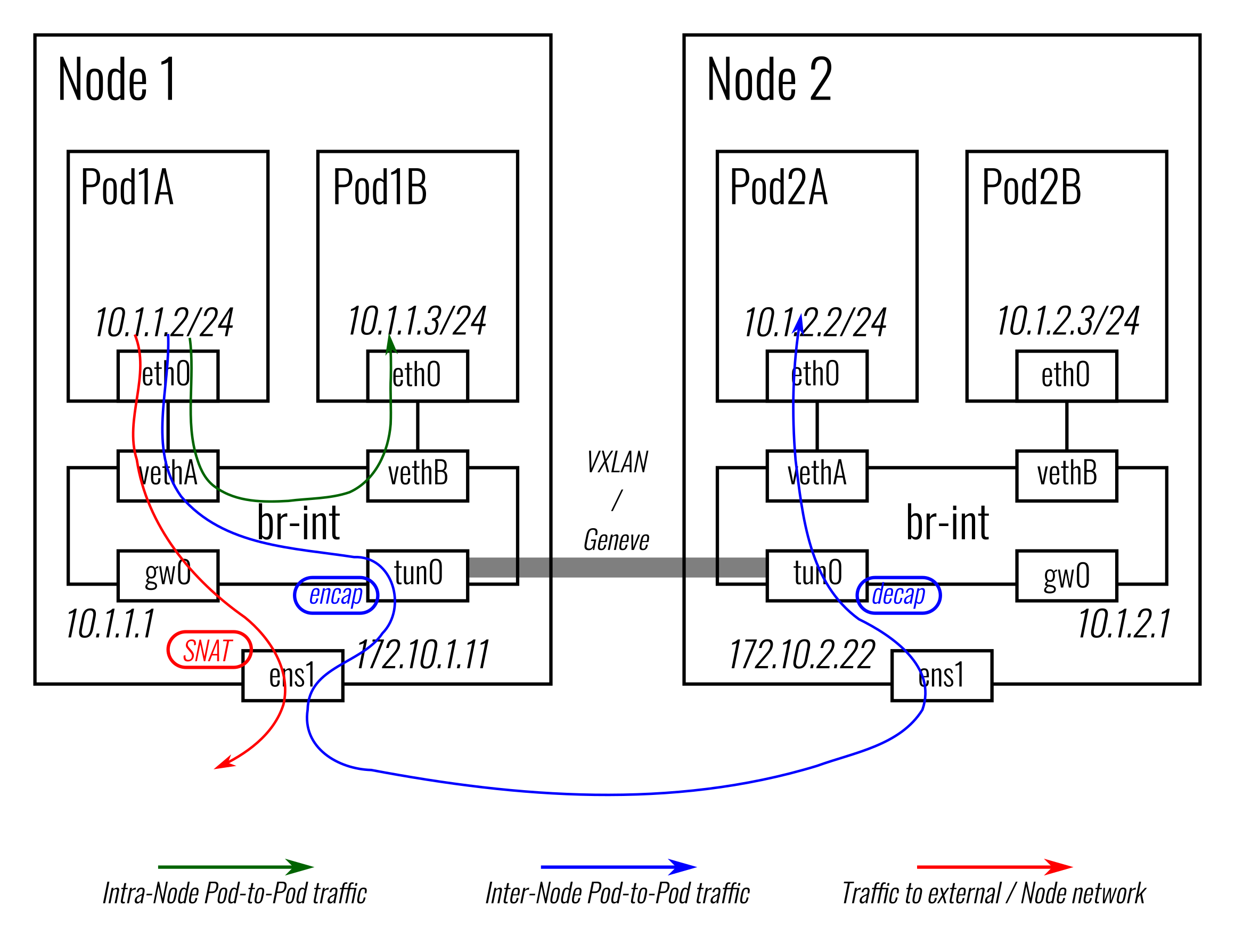
While antrea offers a [CRD for egress](Traffic walk), I cannot find any indication that is used in the VCF Management Services.
With this, he standard paket flow for pods applies and the antra documentation offers a pretty good paket flow picture.
Proxy (added 2026-06-26)
The documentation has a section about proxy support, but I could not test it so far

Comments